Verizon Family Roles & Permissions
A platform level redesign of how people are invited, assigned permissions, and managed across Verizon Family and the new Gizmo Watch integration.
Project Details
Project Goal: To design a single, scalable roles and permissions system that improves clarity and flexibility for existing Verizon Family users while enabling seamless integration with current and future products such as Gizmo and pet trackers.
Context: Verizon Family historically applied permissions at the family level, which simplified early use cases but limited flexibility as:
Family structures became more complex
Device types expanded
Use cases extended beyond traditional parent/child models
This project addressed those limitations at a platform level, balancing usability, technical feasibility, and long-term scalability.
Lead Product Designer: Led end-to-end experience design for roles, permissions, and invites. Partnered with Product, Engineering, and UX Research. Owned system logic, interaction patterns, and iteration strategy
Timeline: January 2025 – November 2025
Shipped: December 2025
Results & Metrics
-
All participants successfully added managers, members, and supervised members via Gizmo, validating the clarity of the core invite and permissions model.
-
Across all tested flows, users consistently rated the experience as easy and intuitive, indicating strong comprehension of roles, permissions, and next steps.
-
Testing revealed that adding a supervised member’s phone was the only flow with reduced success, directly uncovering a mental model mismatch rather than a system failure.
-
User confusion around the term “supervised member” and device-first decision-making informed a focused iteration that shifted the experience to a person-first model (Add Adult / Add Child / Add Pet).
-
Users clearly understood automatic permissions assignment, confirming trust in the system even as content density was flagged for future optimization.
We followed a user-centered design process focused on four core phases:
Research
Design
Review
Testing
Iteration
Groom & handoff
QA
My Process & Participation
I led the design work end to end, partnering closely with a senior designer, Product, Engineering, and UX Research. Early in the project, I audited the existing Verizon Family experience to understand current flows, system constraints, and technical limitations.
Using those insights, I explored and designed multiple concepts, built interactive prototypes for usability testing, and iterated on the designs based on research findings. To support efficiency and consistency, I created a shared component library that allowed system-level updates rather than screen-by-screen changes.
Throughout development, I remained involved during grooming and implementation, answering questions, refining designs, and ensuring design intent carried through to launch.
Key Insight 1
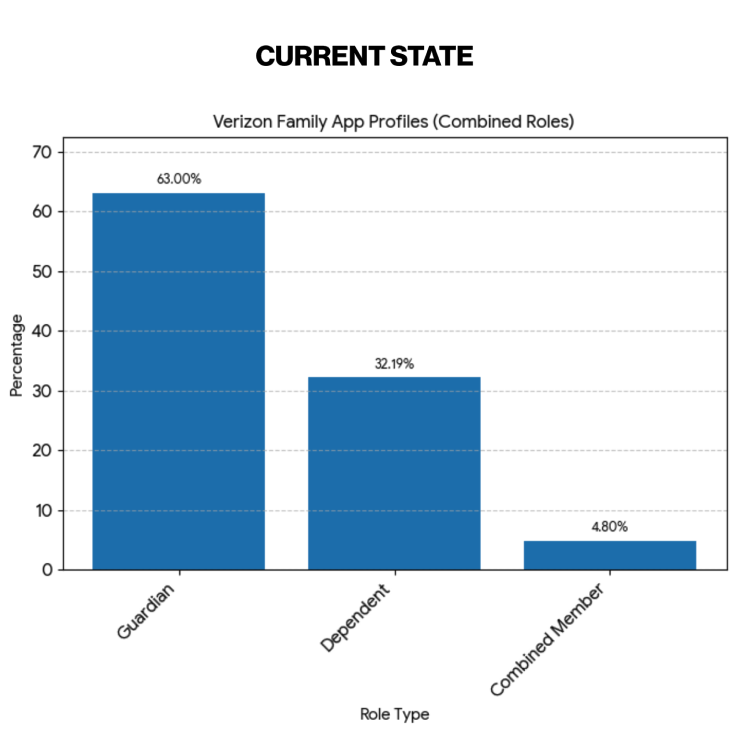
Guardians and dependents make up a combined total of 95% of Verizon Family users.
Our current experience is structured around family-level relationships, which means roles and permissions are applied to entire family groups rather than individuals.
Key Insight 2
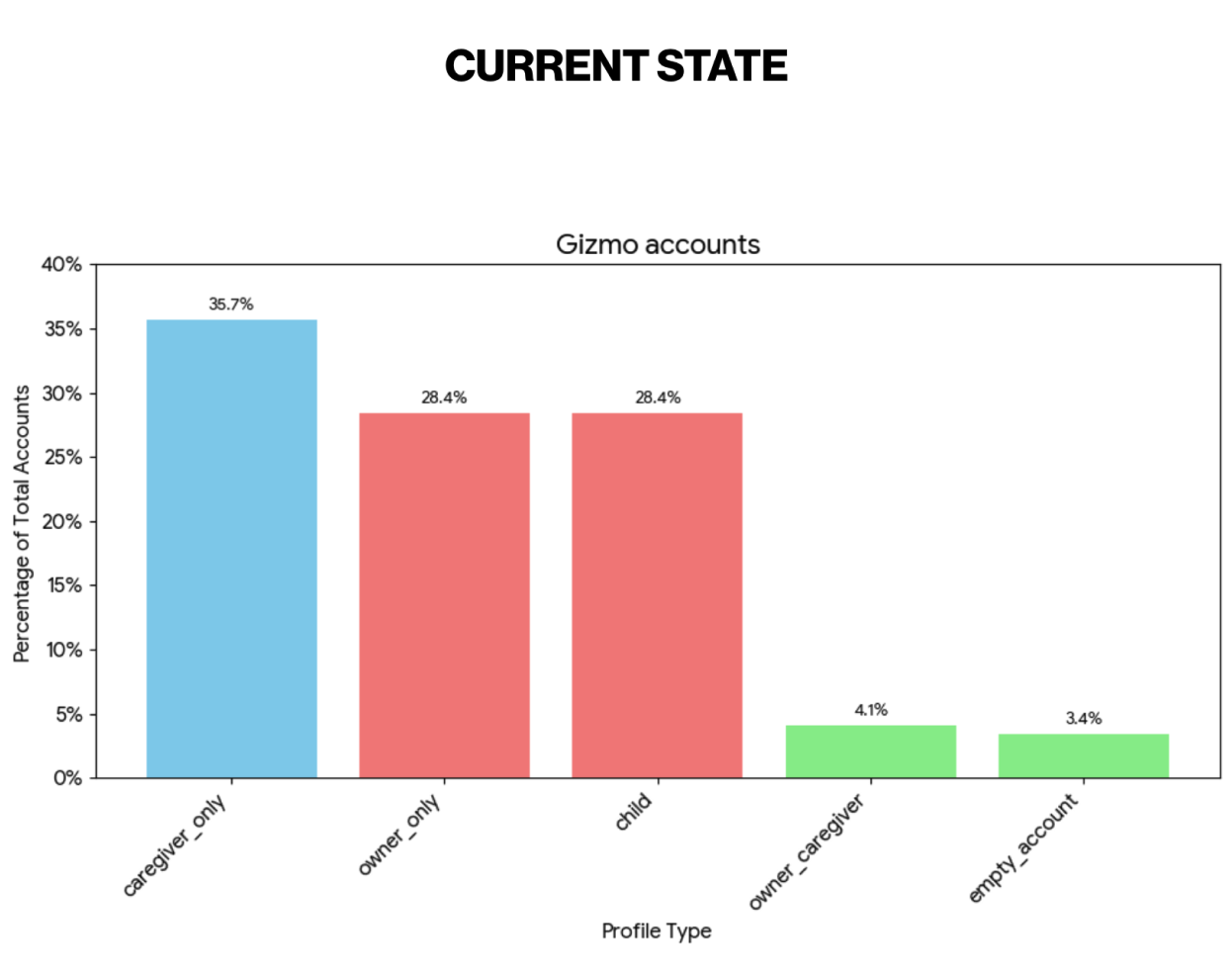
Caregivers make up over 36% of Gizmo accounts, followed by 29% being owners.
The Gizmo Watch is structured around device-level relationships, which means roles and permissions are based on individual relationships rather than family-level access.
The Opportunity: Adopting the Gizmo Model
Gizmo’s structure is built around per-child relationships, which we can apply to the Verizon “Family Member” role.
Inspiration: Gizmo’s Granular Model
Gizmo uses a per-device model that allows greater flexibility for caregivers, closely aligning with the intent of the Member role.
Defined Roles & Relationships
Supports differentiated access levels for specific devices.Clear, Limited Access
Features like “No Permission” enable low-access scenarios such as nannies or friends.
Vision: Extending Granularity to the Member Role
Apply this per-dependent logic to the Member role when managing specific child profiles.
Enhanced Member Role
Empower Members to manage specific children rather than granting access to all children by default.Goal
Enable the Member role to support complex family scenarios by allowing targeted, per-child access.
Core Problems
-
![]()
Rigid Permissions
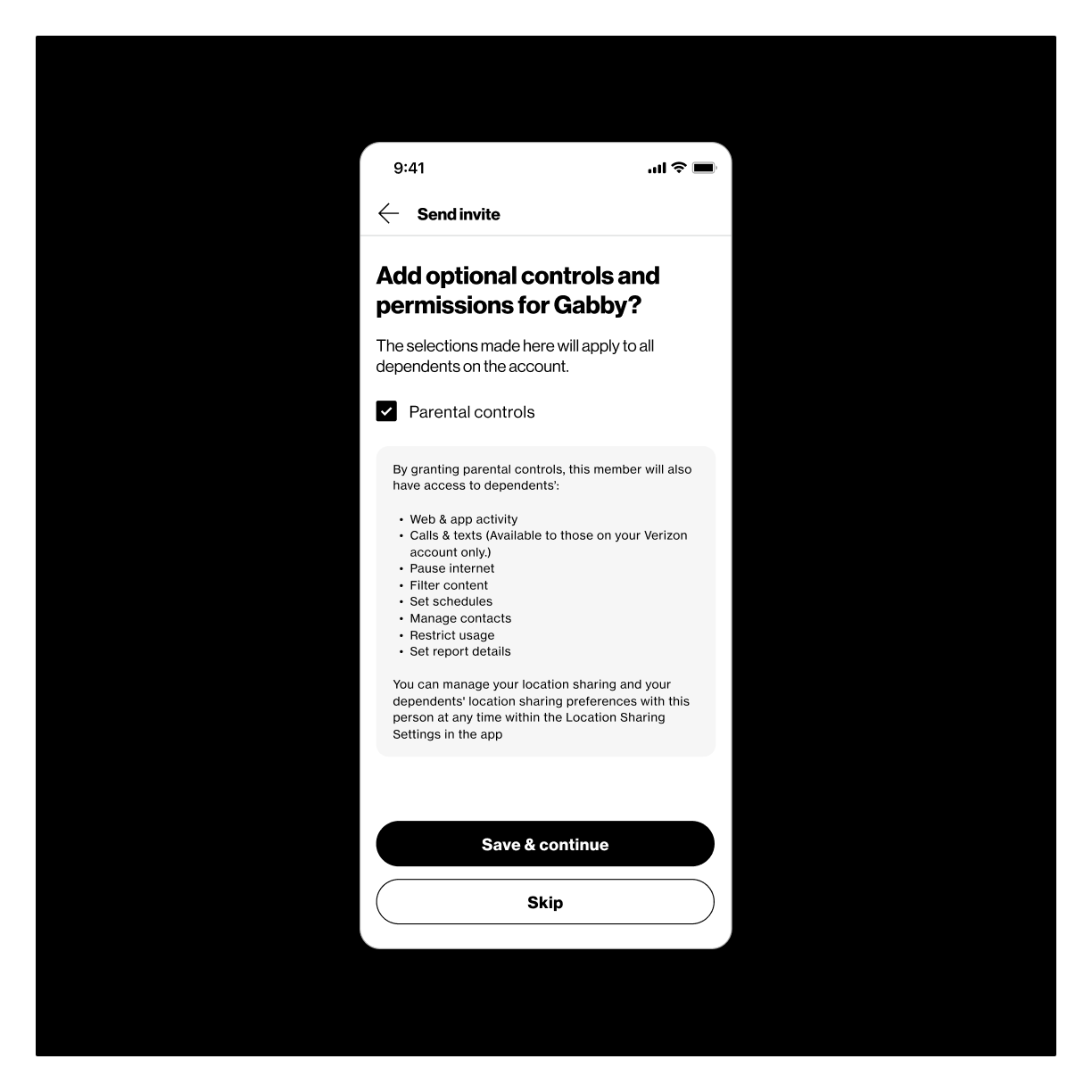
Current settings follow an “all-or-nothing” model that does not support diverse scenarios such as divorced parents, babysitters, or other non-traditional family structures. This means when a member is granted parental controls, “ALL” permissions are applied to “ALL” child profiles on the account. This creates challenges for parents who want more granular control.
-
![]()
Overly Complex Invite Flow
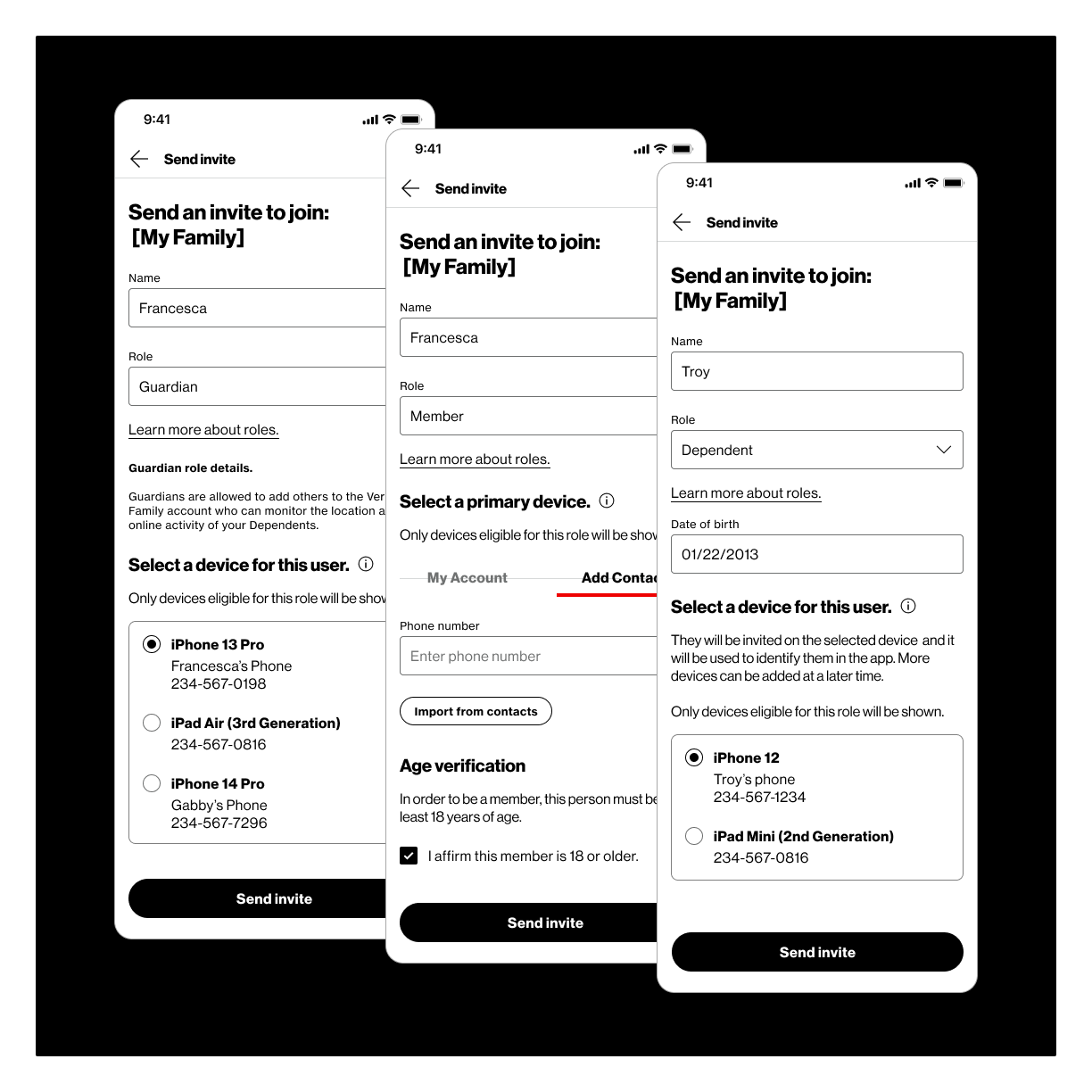
The existing invite flow along with the addition of Gizmo watch integration, significantly increase steps involved in sending an invite which would cause even more user frustration.
-
![]()
Gizmo Watch Integration
The Gizmo watch and app is a popular kids smart watch that allowed parents to monitor their children. We were tasked with sun setting the Gizmo Hub app and interacting it in to the Verizon Family app. Their were major complexities that included backend relationships and current Gizmo customer familiarity challenges that we had to overcome.
-
![]()
Role Selection Confusion
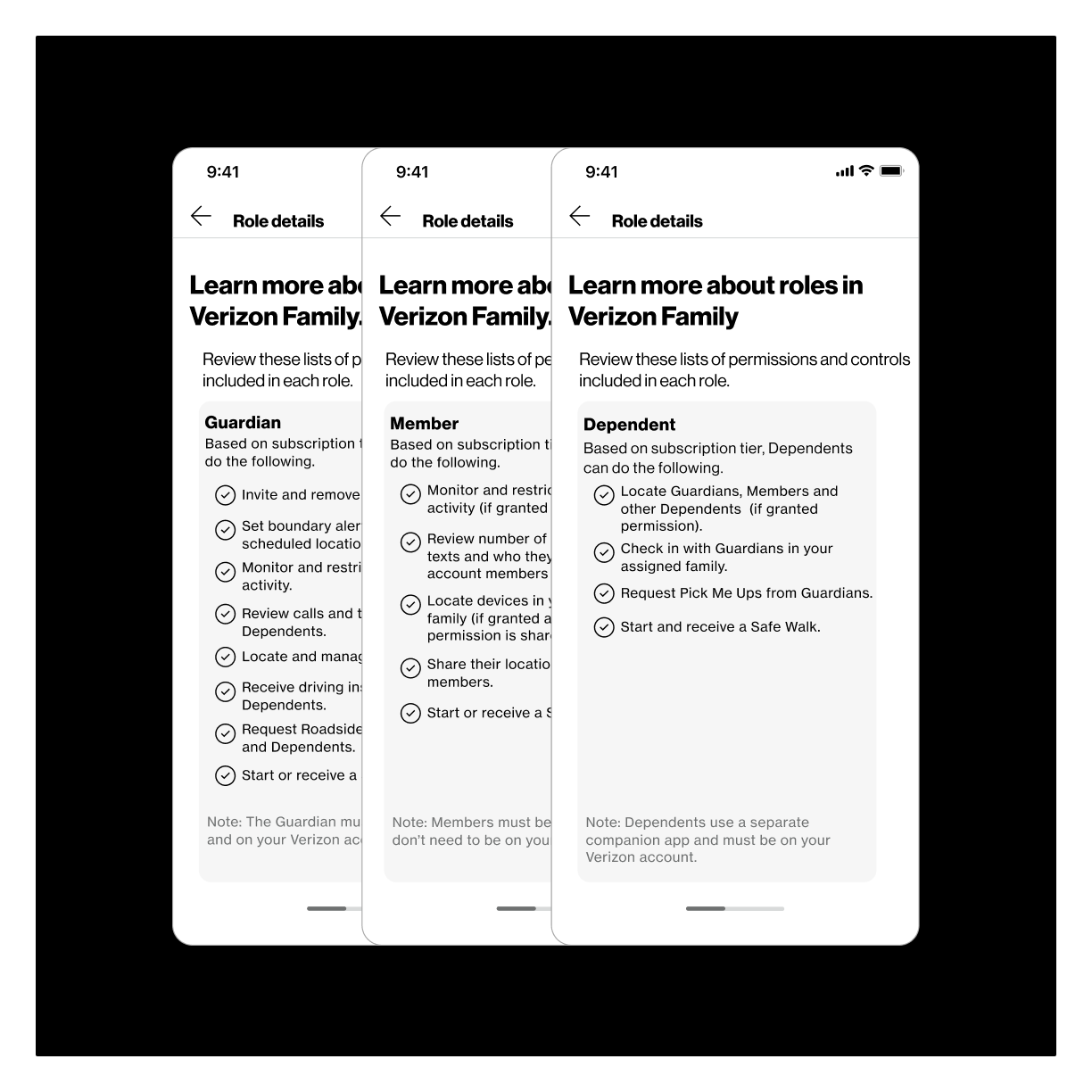
Users were confused about the difference between the adult roles and frustrated with not being able to change them after invites were sent. They also struggled with understanding why certain devices from their verizon account weren’t visible based on the selected roles they chose.
-
![]()
Limited Location Sharing Settings
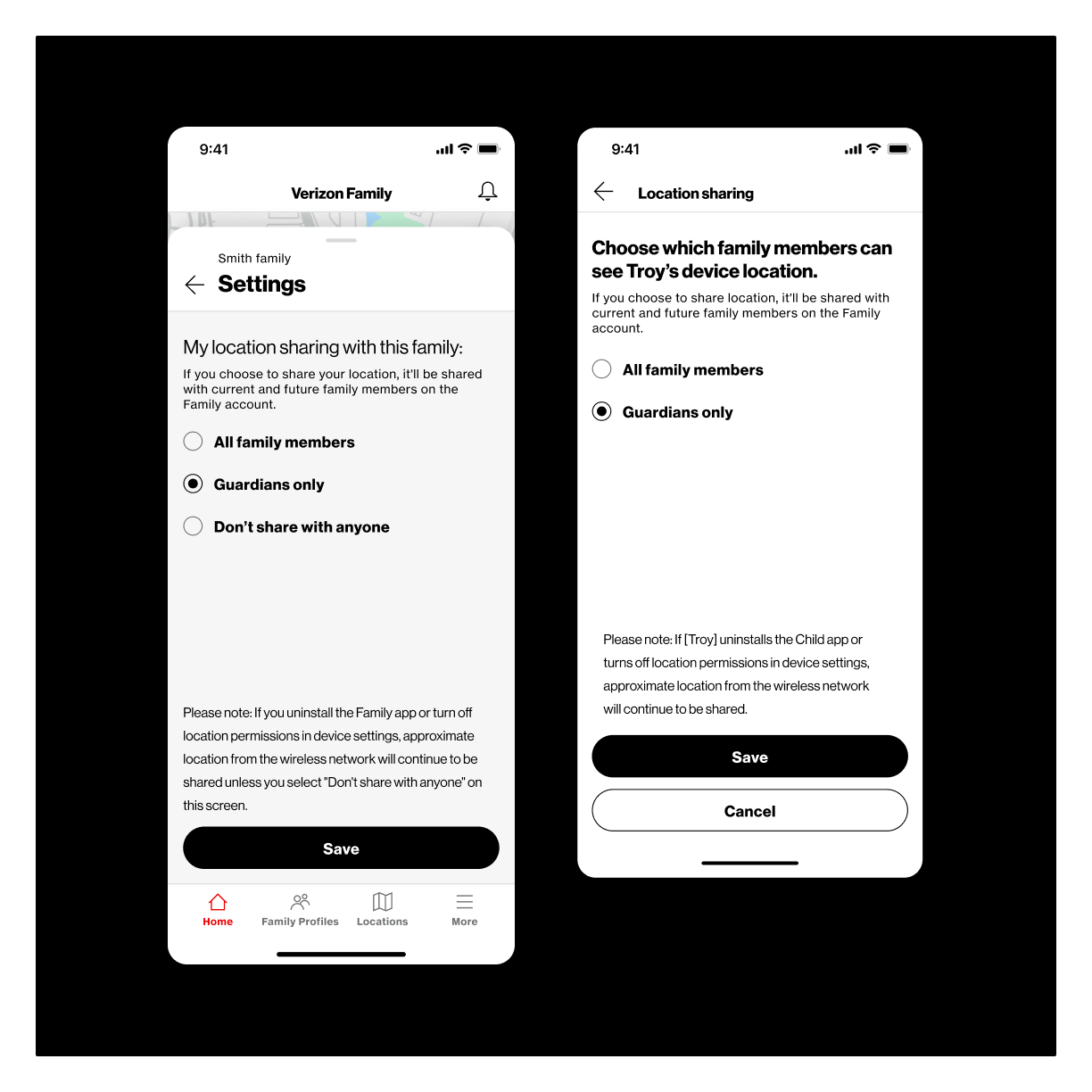
Our MVP solution for location sharing controls was limited to selecting from the whole family, account guardians, or no body. The settings for child devices were controlled by the guardians and were not allowed to be turned off.
The Intent: Adapt to the Modern Family
To evolve the Verizon Family experience from a simple, rigid control structure to a flexible, real-world permissions model that supports diverse modern families and scales effectively
-
Eliminate the “all-or-nothing” frustration and reduce onboarding friction.
-
Align our parental control structure with granular, per-profile control.
-
Unify the Verizon Family and Gizmo permission models into a single, cohesive, and scalable architecture.
-
Lay the necessary groundwork to support more complex multi-child permission scenarios in the future.
Solutions
Results from collaboration with our product, research, development, and QA partners.
01
Automate & simplify how users invite other members
02
Make permissions granular & scalable for all user types
03
Seamlessly integrate the Gizmo Watch customers
04
Grant individual control for location sharing
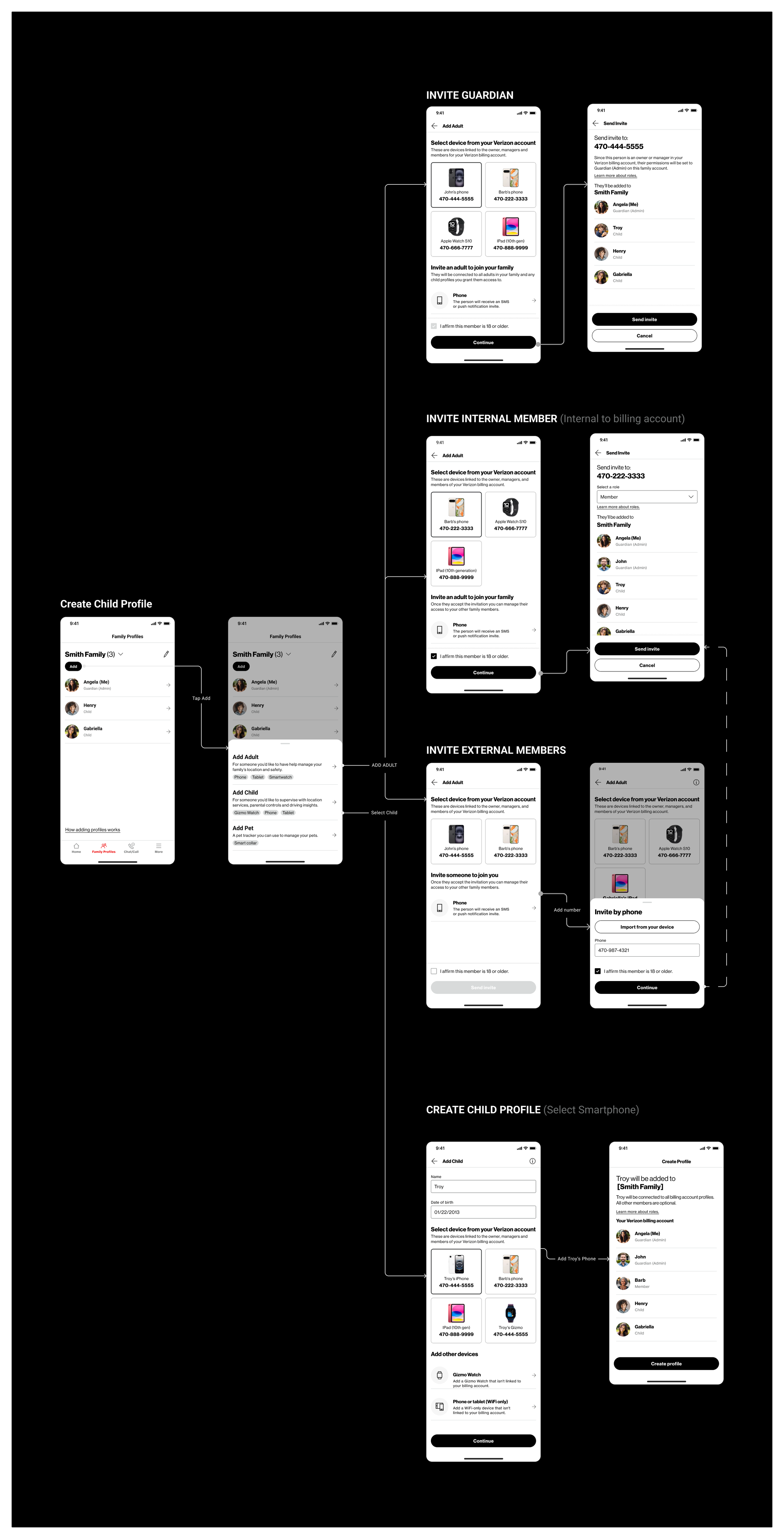
The original invite flow dropped every user into the same generic form regardless of who they were adding. This created unnecessary steps, confusion around device selection, and no clear path for newer device types like the Gizmo watch.
The redesigned experience starts with intent, asking who you want to add first, then tailoring every step that follows.
01 A Smarter Way to Add Family Members
Key challenges and how we solved them:
Intent-driven entry point: The flow now asks whether you're adding an adult, child, or pet up front, which determines the fields, device options, and setup steps you'll see.
Smarter device selection: Devices are filtered automatically based on the user type and what's available on the billing account, removing guesswork and reducing errors.
Gizmo watch integration: By restructuring around user type, we were able to fold Gizmo watch setup directly into the child flow rather than treating it as a separate process.
Relationship mapping for Gizmo: When a child is being added with a Gizmo watch, the flow prompts users to define the child's relationship to existing family members during profile creation, which feeds into the permissions model from the start.
Fewer screens, less friction: Backend automation handles things like age verification and role assignment behind the scenes, so users aren't manually working through steps the system can resolve on its own.
02 Granular Permissions Built for Real Families
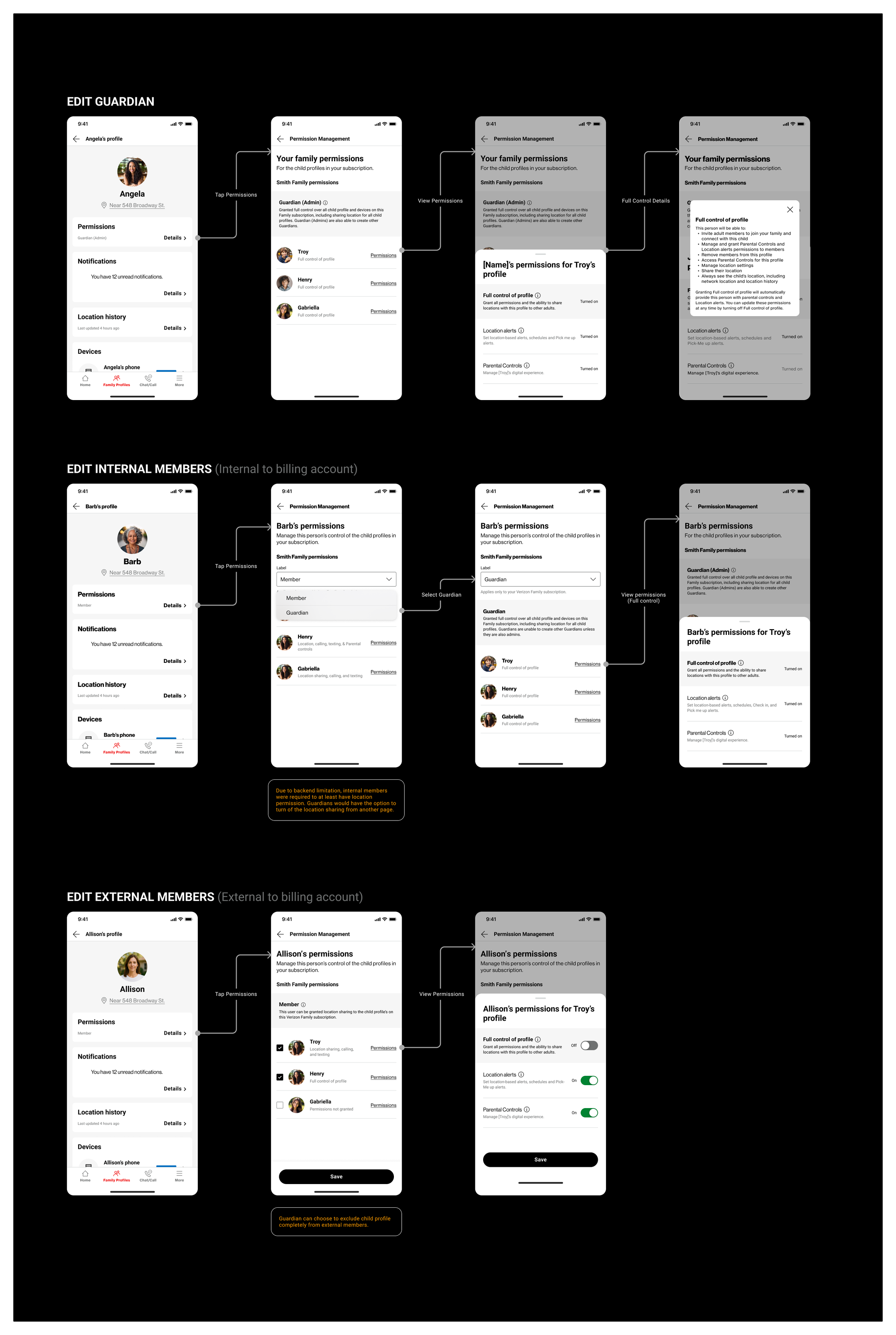
The original experience used a family-wide, all-or-nothing permissions model. Promoting someone to Guardian gave them full access across every dependent, which didn't reflect how caregiving actually works. In practice, families regularly need to share limited, context-specific access with people like babysitters, extended family, or co-parents who are only responsible for certain children.
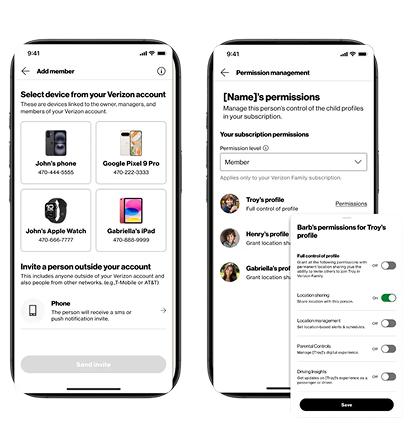
The redesigned system separates roles from permissions. Selecting "Guardian" still grants full access across all children, keeping it consistent with the original model, but now members can stay in the "Member" role and receive granular permissions at the individual child level.
The system supports three levels of access:
Promote to Guardian (Full Access): Gives full permissions across all children, along with extended capabilities like inviting others to view a child's location.
Member with Full Control per Child: Keeps the user in the Member role while giving them complete responsibility over specific children, without exposing the rest of the family.
Member with Partial Control per Child: Allows permissions to be assigned by child and by capability, so someone can have limited access without being elevated to Guardian or given full control.
03 Seamlessly Integrate Gizmo Watch
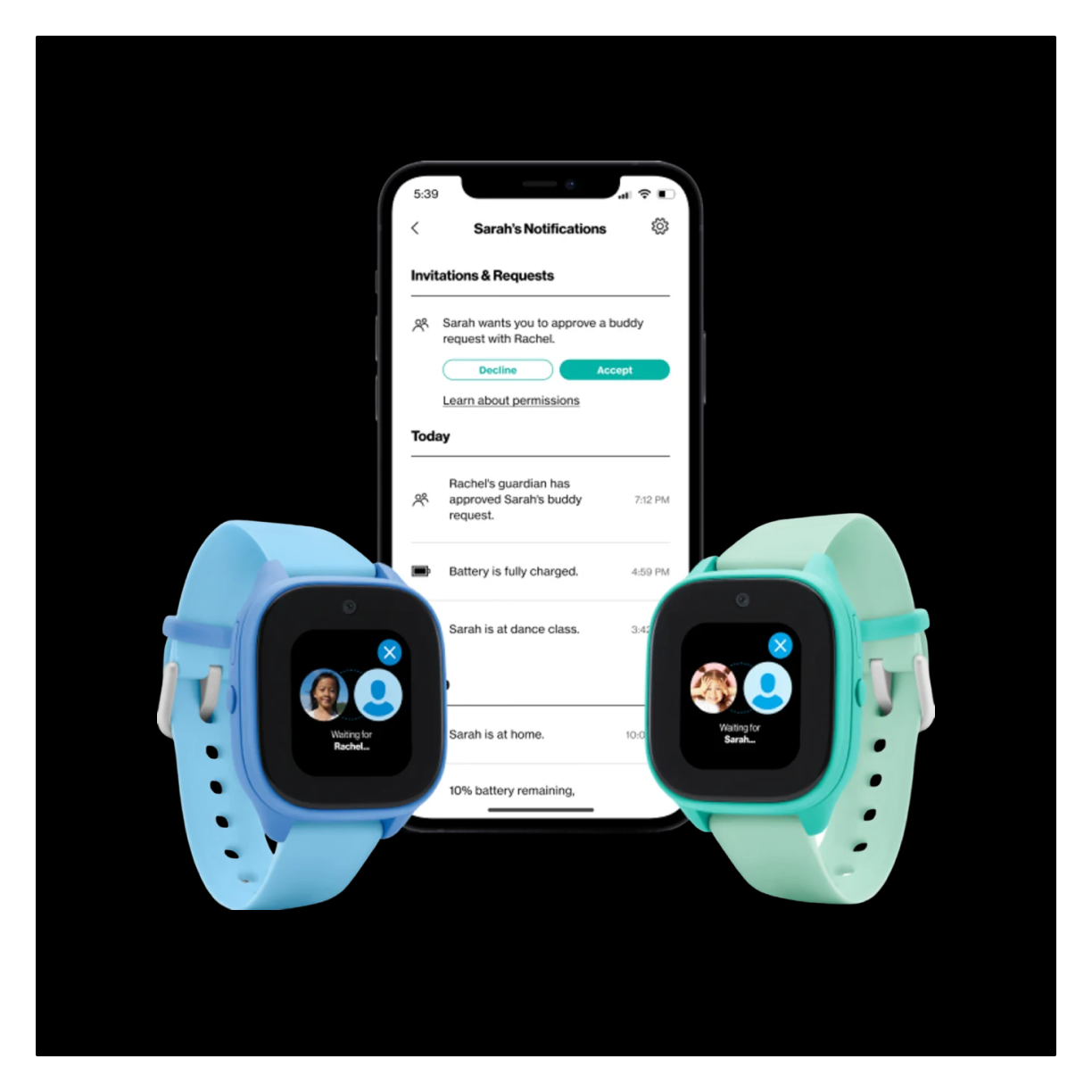
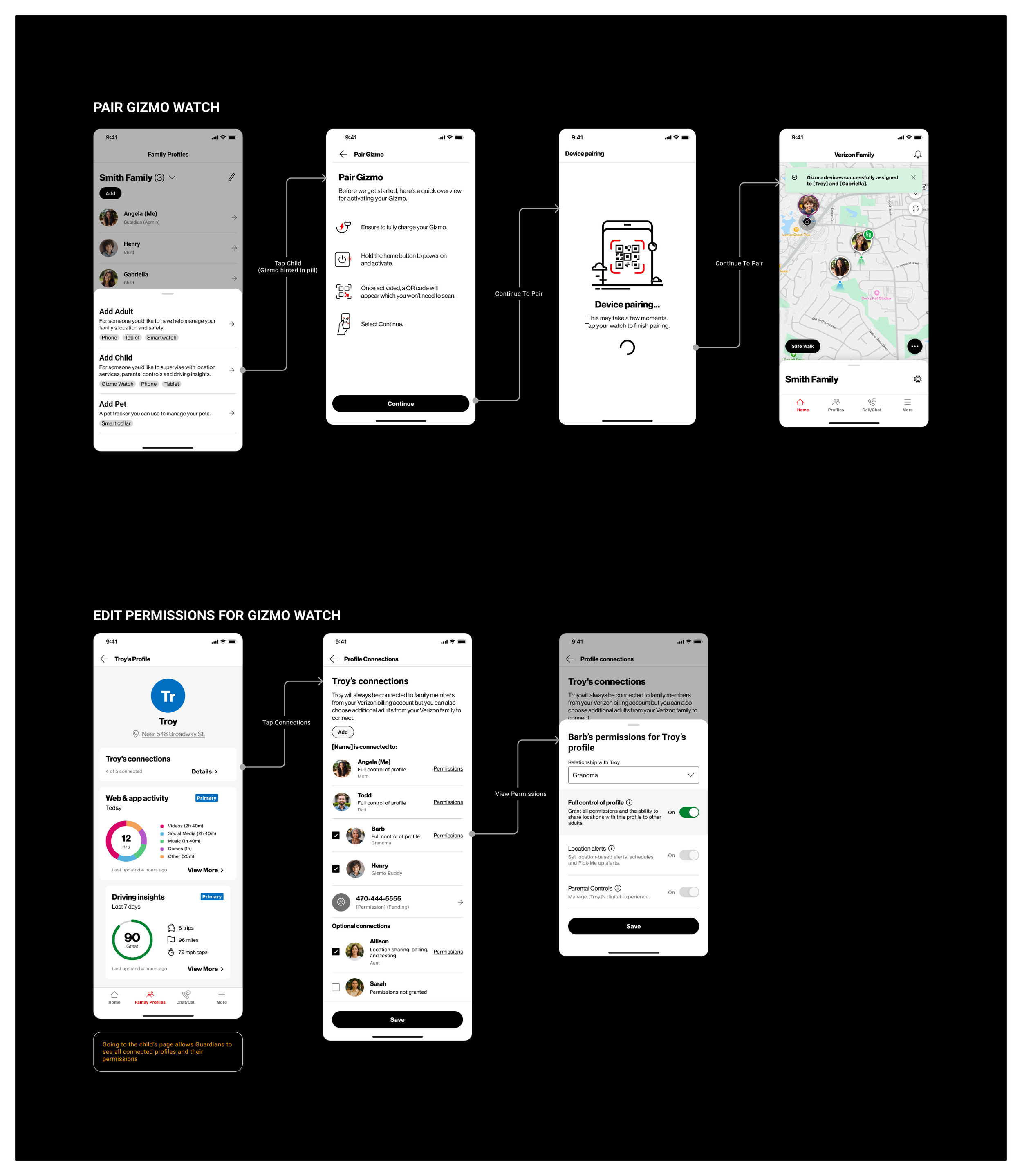
The Gizmo watch and app is a popular kids smartwatch that lets parents monitor their children. Our team was tasked with sunsetting the standalone Gizmo Hub app and folding its functionality into the Verizon Family app. This came with real complexity on both sides, from backend relationship structures to making sure existing Gizmo customers could transition without losing familiarity.
Key challenges and how we solved them:
Simplified language: We renamed the "Dependent" role to "Child," making it immediately clear for both existing Gizmo users and new families, and better aligning with the app's name and purpose.
Clear entry point for Gizmo: We made it obvious where to add a Gizmo watch within the child flow, so parents aren't hunting through menus or guessing where to start.
QR code setup: Adding a Gizmo is as simple as scanning a QR code, cutting down on manual input and making first-time setup fast.
Relationship mapping: When a child has a Gizmo, the flow prompts users to define how each family member relates to that child, which feeds directly into who gets access to what.
Honoring Gizmo's existing permissions model: Gizmo already had granular, per-device permissions, so we needed to preserve that flexibility for current customers while bringing it under the new VZ Family structure. Existing Gizmo users shouldn't feel like they lost control in the transition.
Bridging two permission models: Gizmo's per-device approach actually inspired how we extended granularity to the Member role across the broader Family app, turning a migration challenge into a design opportunity.
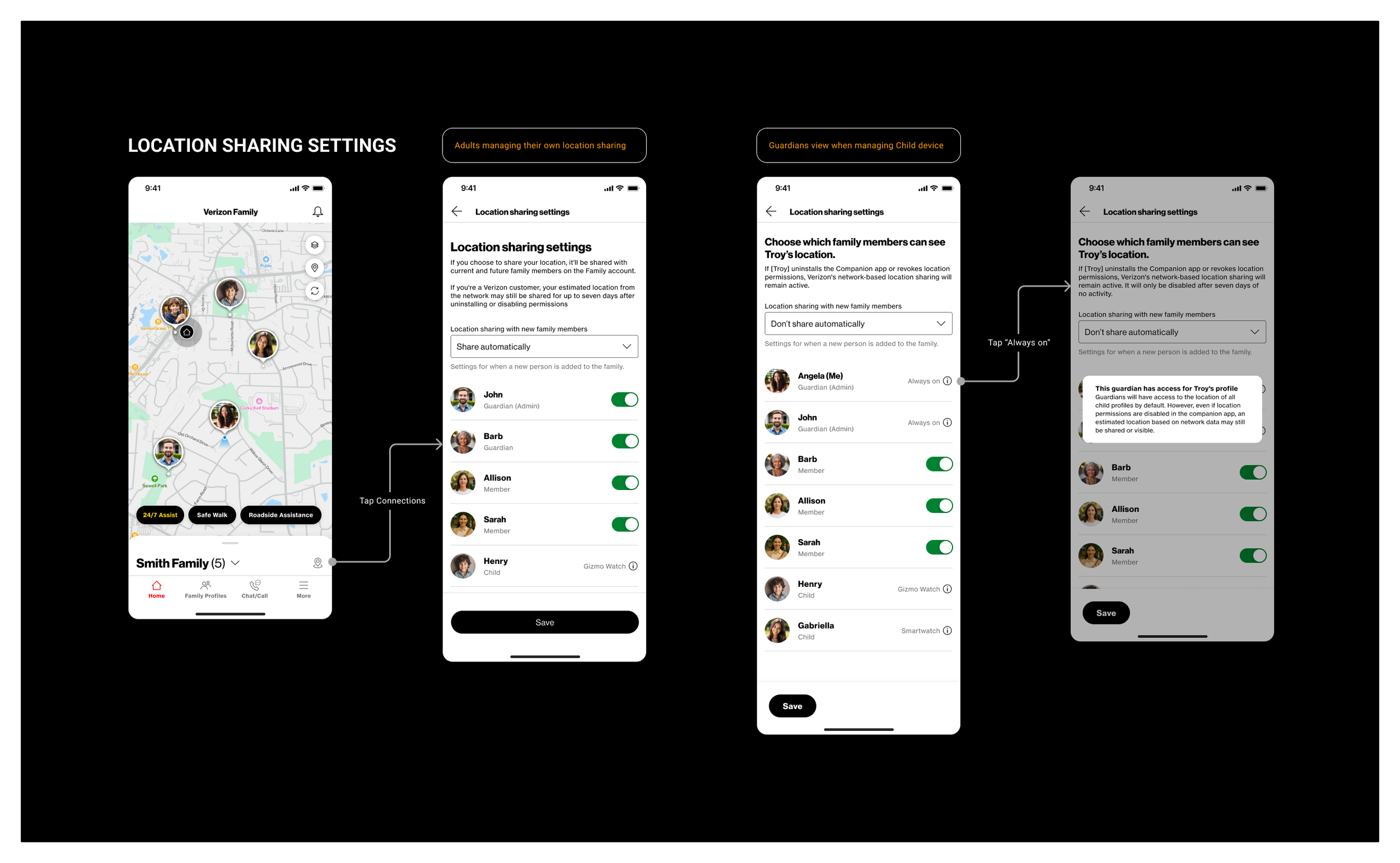
04 Grant Individual Control For Location Sharing
Key challenges and how we solved them:
Per-person toggles: Instead of choosing between broad groups, users can now turn location sharing on or off for each individual family member, giving them precise control over who sees what.
New member defaults: A dropdown lets users decide whether new family members automatically get location access or not, so sharing preferences stay intentional as the family grows.
Guardian visibility is always on for children: Guardians always have access to a child's location by design, which is clearly labeled as "Always on" so there's no confusion about why it can't be toggled off.
Gizmo and smartwatch handling: Children with a Gizmo watch or smartwatch are surfaced in the list with a clear device label, and their location sharing follows the same per-person model rather than being managed separately.
Adult autonomy preserved: Adults in the Member role can still control their own location sharing preferences, choosing exactly which family members can see them without needing a Guardian to manage it for them.
The original location sharing settings gave users three broad options: share with the whole family, share with guardians only, or don't share at all. There was no way to choose specific people, and for child devices, guardians controlled everything with no option to turn sharing off. It was rigid and didn't account for the nuance families actually need.
The redesigned experience gives every user person-level control over who can see their location.